Querying S3 Directly: How I Removed RDS from My Pipeline
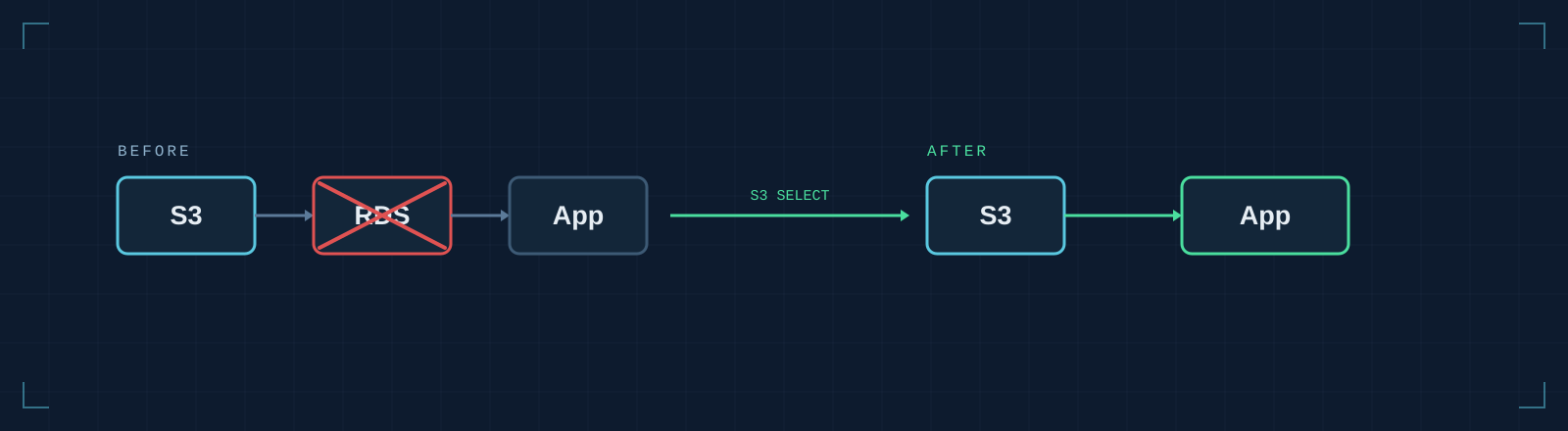
The Pipeline That Took Days
I took over a data pipeline from another dev shop, and on paper the job was simple: pull a few GBs of CSVs from S3, process them, push the results downstream.
But the runtime was measured in days. Sometimes closer to a week.
A few GBs of data shouldn't take a week to process. This was an architecture problem, not a data-volume one, and I needed to find where.
The Setup I Inherited
The design I walked into had its own internal logic.
Here's the constraint they were working around: S3 is object storage. You can't run SQL against a CSV sitting in a bucket. So their solution was reasonable on its face: download the CSVs from S3, load them into RDS, then query RDS for the subset of data the pipeline actually needed.
Familiar tooling. SQL access. A structured schema. If you squint, it looks like exactly what you're supposed to do.
The flaw was the assumption underneath every step: that RDS was a necessary bridge between files in S3 and usable data. Nobody had stopped to ask whether that bridge needed to exist at all.
It didn't.
Where the Time Was Actually Going
Before I changed anything, I profiled it. (This is the one habit I'd press on anyone inheriting a slow system: measure before you theorize.) The time wasn't in the processing logic at all. It was in getting the data into RDS in the first place.
And that makes sense once you think about what a relational database actually has to do. Loading GBs of CSV data is slow by design. Every row gets parsed, type-checked, and written to disk. Inserts batch up, sure, but you're still paying for a full write path on every record across a lot of large files.
Then came the part that really stung. After all that loading, the pipeline read back only a fraction of what we'd stored: a narrow date range and a handful of columns. We were writing every row and column to disk to use a sliver of them.
The database wasn't solving a problem. It was the problem. Every GB we pushed into RDS was time the pipeline spent shuffling data around instead of doing anything useful with it.
Discovering S3 Select
So I went looking for a way to cut out the middleman, and that's where S3 Select came in.
If you haven't run into it before, the idea is deceptively simple: S3 Select lets you run SQL queries directly against objects sitting in S3. The filtering happens server-side, so S3 hands back only the rows and columns you asked for before any data crosses the network. You pick the format (CSV, JSON, or Parquet), write a SELECT statement, and that's it.
No intermediate database. No download step. No ingestion.
The data was already in S3. It had always been in S3. The entire RDS layer existed to solve a problem that S3 Select quietly made irrelevant.
Rewriting the Ingest Layer
With that, the rewrite almost designed itself. Here's what the old flow looked like for each file:
download_from_s3(bucket, key, local_path)
create_table_if_not_exists(conn, table_name, schema)
load_csv_to_rds(conn, local_path, table_name)
results = run_query(conn, f"SELECT col1, col2 FROM {table_name} WHERE date >= '2024-01-01'")
And here's the replacement:
response = s3.select_object_content(
    Bucket=bucket,
    Key=key,
    ExpressionType='SQL',
    Expression="SELECT s.col1, s.col2 FROM S3Object s WHERE s.date >= '2024-01-01'",
    InputSerialization={'CSV': {'FileHeaderInfo': 'USE'}},
    OutputSerialization={'CSV': {}},
)
Four steps collapsed into one. Everything in between (the RDS connection, the schema definition, the bulk insert logic, the local download, the cleanup) simply went away. The pipeline now asks S3 for exactly what it needs and gets exactly that back. Nothing left in the middle to manage.
What Actually Changed
Runtime dropped from days to hours.
That's the headline, and it's a good one. But if you've ever pulled a whole component out of a system, you know the runtime win is only half the story. The second-order effects were worth just as much. No RDS instance to provision, size, or maintain. No schema migrations when the upstream CSV format shifted. No cleanup logic to truncate tables between runs. No connection pool to keep alive.
The whole shape of the pipeline simplified from get data → download → stage → ingest → query → process down to get data → process.
Fewer moving parts. Smaller surface area. A lot less that could quietly break at 2am, which, if you've ever been on call, you'll appreciate even more than the speed.
When to Query In Place (and When Not To)
It's not a silver bullet, though, and the boundaries are worth knowing before you reach for it.
It's the right call when:
- Your data lives in S3 as CSV, JSON, or Parquet files
- You need a subset of rows or columns, not the entire dataset
- A database is in the pipeline mainly as query middleware, not for its relational features
And it's the wrong call when you need joins across multiple objects, when the pipeline writes data back, or when you genuinely need relational semantics: indexes, constraints, real relationships between tables. Force it into those jobs and you've only traded one bad fit for another.
What I'd Reach For Today
S3 Select is closed to new accounts now, so if you're starting this from scratch the mechanism is different even though the move is the same.
Athena is what AWS points you to, and it isn't a drop-in swap. S3 Select filtered one object per call, which is why my rewrite kept the pipeline's file-by-file loop. Athena is serverless SQL over a whole prefix through a catalog, so you'd ask one query for the entire date range instead of looping. That's a better fit than what I built. The loop was a constraint of the tool, not something the job needed.
DuckDB is the other answer, and it needs no AWS service at all: point it at the CSV or Parquet in your bucket, run SQL, done. For a pipeline this size it's often the shortest path.
Either way, the RDS layer still doesn't come back.
The question worth carrying into any pipeline is this: what work is the database actually doing? Not in theory: what is it earning its keep doing right now?
If the answer is "holding data temporarily so we can filter it," there's a good chance a shorter path exists. We had GBs staged through RDS just to read a fraction of it back out. S3 Select cut out everything in the middle.
Not every data problem needs a database. Sometimes the fastest thing you can do is stop moving the data and meet it where it already lives. Next time a pipeline feels slower than it should, don't just tune the parts. Ask whether one of them should be there at all.